
Sticky Notes
2.3
Size: 273 KB
Downloads: 4405
Platform: Windows (All Versions)

In today's busy world, using sticky notes is a very good idea for keeping track of things and recalling certain pieces of information. The reason why sticky notes are so popular is that they can be stuck anywhere through the house or the office, allowing the information contained by them to always be at a person's reach. But what if you could do the same using your computer and creating virtual sticky notes on your desktop? Thus, you will be able to recall tasks, events and meetings much easier than using paper notes, as you will have them all on the desktop, thus never losing sight of them.
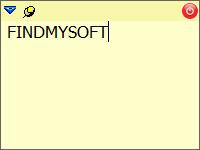
Sticky Notes is the program I am talking about. It's a Windows application with a very intuitive name that does exactly what its names says, it allows adding an unlimited number of sticky notes to the desktop, each containing any piece of information. After the application is launched, it will place an icon in the system tray, from where the user can create a new note by simply left clicking on the icon. Each note can be set to stay on top of any application and can have a transparency level, for not bothering the user with his work. Besides that, notes can be added to several categories, for making it easier to differentiate one from another.
Using the right mouse button on the system tray icon, the user can have access to a context menu from where he can configure all the program's settings. From here, he can configure some hot keys to be used for accessing the program's functions, like creating or deleting notes.
Each note can have its own alarm, allowing it to play a certain sound file at a specific hour. This can help the user recall a certain task or piece of information.
Pros
It allows adding an unlimited number of sticky notes to the desktop, each having its own text. Besides that, notes can be set to stay on top or to have a certain level of transparency. Furthermore, each note can play an alarm at a specific hour. What's more, each note can be put into a category, for making it easier to manage many notes.

Cons
The program doesn't have an actual interface, like a notes manager. Besides that, notes cannot contain images but only text and cannot have a title. Sticky Notes is a practical tool for adding an unlimited number of sticky notes to the Windows desktop.

Sticky Notes
2.3
Download
Sticky Notes Awards

Sticky Notes Editor’s Review Rating
Sticky Notes has been reviewed by Jerome Johnston on 02 Apr 2012. Based on the user interface, features and complexity, Findmysoft has rated Sticky Notes 4 out of 5 stars, naming it Excellent







